 WhoSaid
Interest score
How keen the applicant is on this property, from 0 to 100, based only on what they said. 70 or above is Hot; lower scores show as Warm or Cold.
Record the viewing with WhoSaid. By the time you are back at the car, you have the applicant's interest score, budget, timing, who else decides and a follow-up ready to send on WhatsApp or by email.
For iPhone and Apple Watch · English, Turkish, Spanish
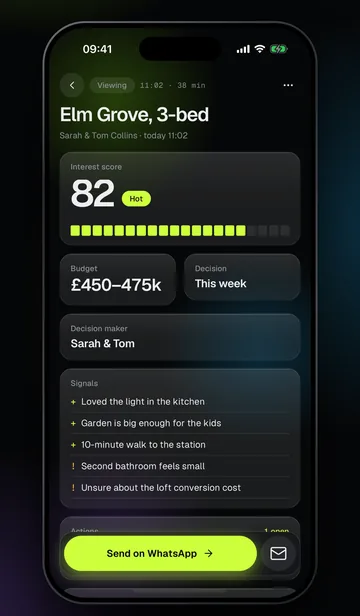
Set your profession to Property and every recording is analysed as a viewing, using the same viewing feedback template each time. No more property viewing notes scribbled on the back of the particulars.
How keen the applicant is on this property, from 0 to 100, based only on what they said. 70 or above is Hot; lower scores show as Warm or Cold.
The budget they mentioned, and when they expect to decide.
A partner, a parent: who they will decide with, and who should come to a second viewing.
Positives and concerns, point by point: exactly what the vendor or landlord will ask you about.
What you promised stays on the list: a builder's estimate, a second viewing, the service charge. Who does what, by when.
Ready in a friendly or formal tone. Send it on WhatsApp or by email; you tap send yourself.
Three steps, and you only do the first one once. AI for estate agents that works from the conversation, not from forms.
Set it once in Account; you can change it for any meeting.
From your iPhone or your Apple Watch. The phone can stay in your pocket, and if a call comes in, the recording carries on where it left off.
The result and follow-up message are ready. Read it through and send it on WhatsApp or by email.
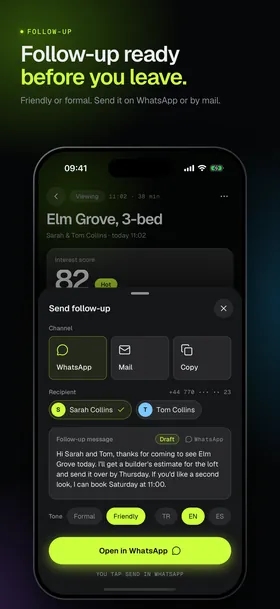
Getting back to an applicant the same day keeps a sale moving. WhoSaid writes the message from what was said at the viewing; you read it and send it.
Hi Sarah and Tom, thanks for coming to see Elm Grove today. I'll get a builder's estimate for the loft and send it over by Thursday. If you'd like a second look, I can book Saturday at 11:00.
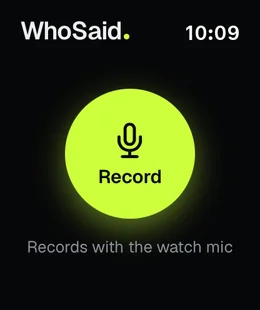
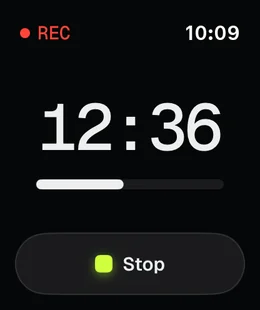
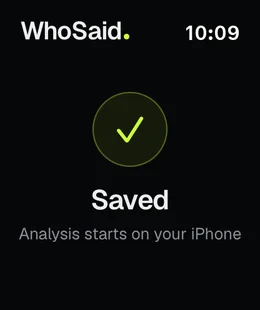
Start the recording from your Apple Watch. The watch records with its own mic; when you stop, the recording moves to your iPhone and is analysed as a property viewing automatically. Your attention stays on the applicant, not on a screen.
Everyone you meet is gathered on the Contacts screen. Filter by Hot to see your keenest applicants, or by Follow-up pending to find those you have not messaged yet, so nobody slips through after a busy Saturday of viewings.
Recording and privacy: A recording of a viewing is personal data, so treat it like any applicant record: tell the applicant before you start and get their consent where needed. WhoSaid can show them a short recording notice, and their confirmation is saved with the meeting. Audio is sent to secure servers only to transcribe and analyse it, deleted shortly afterwards and never used to train models. You can delete your data from the app at any time.
WhoSaid's AI scores how interested the applicant is in the property from 0 to 100, based only on what they said during the viewing. A score of 70 or above is marked Hot; lower scores show as Warm or Cold. It is a summary of the conversation for you, not a prediction.
No. The message is written in a friendly or formal tone and opens in WhatsApp or your email app. You read it and tap send yourself.
Yes. When you send a follow-up you can choose English, Turkish or Spanish for the message. The app and its analyses work in the same three languages.
Recording rules depend on where you are, and a recording of a person is personal data under data protection law such as UK GDPR. Tell the applicant before you start and get their consent where needed; that is your responsibility. WhoSaid processes the audio only to transcribe and analyse it, deletes it shortly afterwards and never uses it to train models.
WhoSaid is free to download from the App Store. Transcription and analysis are billed by the minute: buy a minute pack or subscribe to Pro or Business. Current prices are shown in the app. Speaker separation is only available on the Business plan.
Interest score, budget, who decides and the follow-up, as soon as the viewing ends.
Download on theApp Store